As a supplier of Battery Rotary Tattoo Machines, I've encountered numerous inquiries from tattoo artists about adjusting the speed of these machines. In this blog post, I'll share some insights and practical tips on how to adjust the speed of a battery rotary tattoo machine effectively.
Understanding the Basics of Battery Rotary Tattoo Machines
Before delving into speed adjustment, it's essential to understand the fundamental components and working principles of a battery rotary tattoo machine. These machines are powered by rechargeable batteries, which offer greater mobility and flexibility compared to traditional wired machines. The rotary mechanism inside the machine drives the needle up and down, creating the tattooing effect.
The speed of a battery rotary tattoo machine is typically measured in Hertz (Hz), which represents the number of cycles per second. A higher Hz value indicates a faster speed, while a lower value means a slower speed. Different tattooing techniques and styles require different speeds, so being able to adjust the speed accurately is crucial for achieving the desired results.
Factors Affecting the Speed of a Battery Rotary Tattoo Machine
Several factors can influence the speed of a battery rotary tattoo machine. Understanding these factors will help you make more informed adjustments.


Battery Charge
The charge level of the battery can significantly impact the machine's speed. A fully charged battery will provide consistent power and allow the machine to operate at its optimal speed. As the battery discharges, the speed may gradually decrease. Therefore, it's important to keep your battery fully charged before each tattooing session.
Needle Configuration
The type and size of the needle used in the tattoo machine can also affect its speed. Thicker needles generally require more power to move, which may result in a slower speed. Additionally, the needle's configuration, such as the number of needles in a group, can influence the machine's performance. Experimenting with different needle configurations can help you find the optimal speed for your tattooing needs.
Machine Settings
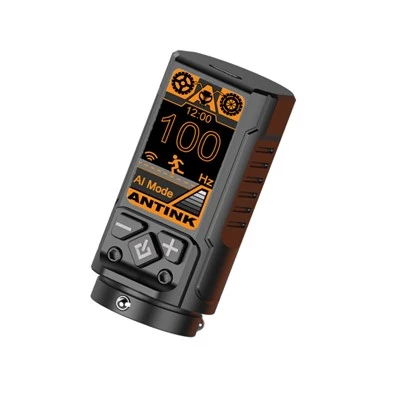
Most battery rotary tattoo machines come with adjustable settings that allow you to control the speed. These settings can usually be adjusted using a dial or a digital display on the machine. Familiarize yourself with the specific settings of your machine and learn how to make precise adjustments.
How to Adjust the Speed of a Battery Rotary Tattoo Machine
Now that you understand the basics and the factors affecting the speed, let's explore the step-by-step process of adjusting the speed of a battery rotary tattoo machine.
Step 1: Prepare the Machine
Before making any adjustments, ensure that the machine is turned off and the battery is fully charged. This will prevent any potential electrical hazards and ensure that the machine operates smoothly.
Step 2: Familiarize Yourself with the Machine's Settings
Refer to the user manual of your battery rotary tattoo machine to understand the specific settings and controls for adjusting the speed. Some machines may have a simple dial that you can turn clockwise or counterclockwise to increase or decrease the speed, while others may have a digital display with buttons for more precise adjustments.
Step 3: Start with a Low Speed
It's always a good idea to start with a low speed and gradually increase it as needed. This allows you to get a feel for the machine's performance and make adjustments based on the specific requirements of the tattoo. Begin by setting the speed to the lowest setting and test the machine on a practice skin or a scrap piece of material.
Step 4: Observe the Needle Movement
As you increase the speed, pay close attention to the movement of the needle. The needle should move smoothly and evenly, without any jerking or skipping. If you notice any irregularities in the needle movement, it may indicate that the speed is too high or that there is an issue with the machine.
Step 5: Adjust the Speed Based on the Tattooing Technique
Different tattooing techniques require different speeds. For example, lining tattoos typically require a higher speed to create clean and precise lines, while shading tattoos may require a lower speed to achieve a smooth and blended effect. Adjust the speed accordingly based on the technique you are using.
Step 6: Test the Speed on the Client's Skin
Once you have adjusted the speed to your satisfaction on the practice skin, it's time to test it on the client's skin. Start with a small area and observe the results. If the speed is too fast or too slow, make further adjustments until you achieve the desired effect.
Recommended Battery Rotary Tattoo Machines for Adjustable Speed
As a supplier, I recommend the following battery rotary tattoo machines that offer adjustable speed settings:
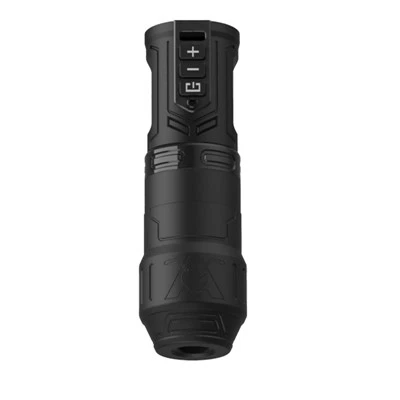
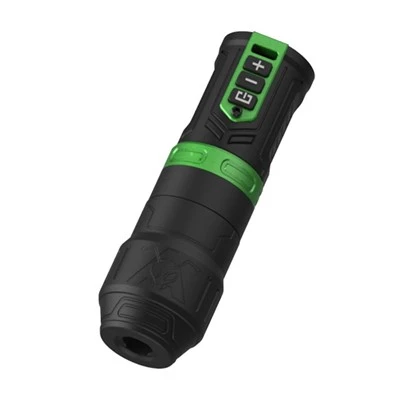
- Adjustable Stroke Wireless Tattoo Machine: This machine features an adjustable stroke and wireless operation, allowing for greater flexibility and precision in speed adjustment.
- Aluminum Rotary Tattoo Machine: Made of high-quality aluminum, this machine is lightweight and durable. It offers adjustable speed settings for a variety of tattooing techniques.
- Adjustable Tattoo Machine: This machine is designed with adjustable speed and other customizable settings, making it suitable for both beginners and experienced tattoo artists.
Conclusion
Adjusting the speed of a battery rotary tattoo machine is an important skill for tattoo artists. By understanding the basics, factors affecting the speed, and following the step-by-step process, you can make accurate adjustments to achieve the desired results. Remember to start with a low speed, observe the needle movement, and adjust the speed based on the tattooing technique. If you're in the market for a battery rotary tattoo machine with adjustable speed settings, consider the recommended machines mentioned above.
If you're interested in purchasing our Battery Rotary Tattoo Machines or have any questions about speed adjustment, please feel free to contact us for a procurement discussion. We're here to help you find the perfect machine for your tattooing needs.
References
- "Tattoo Machine Basics" by Tattooing 101
- "How to Adjust the Speed of a Tattoo Machine" by Professional Tattoo Supplies